How Your RBP Plan Works
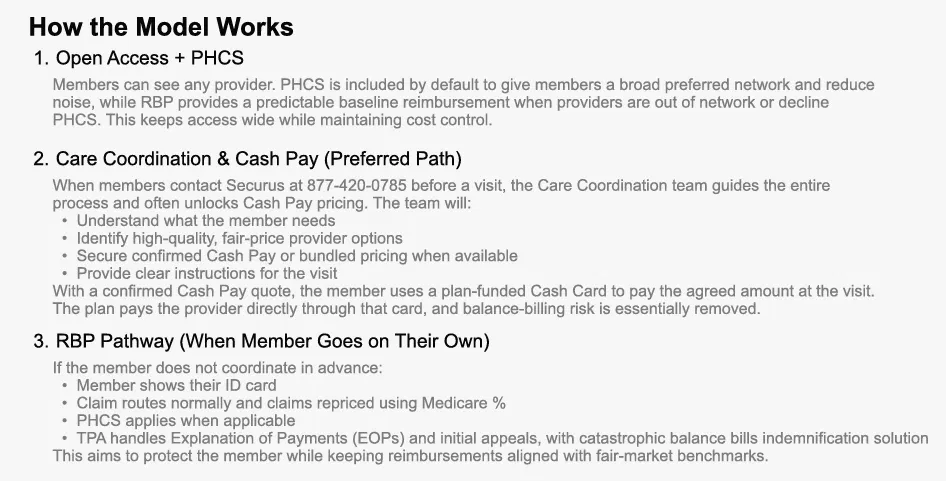
The Triad RBP model explained: open access, care coordination, and Reference-Based Pricing.
View Guide: How Your RBP Plan Works

Program Partner: Arcwood Benefits Consulting
Access your Securus portal, call before your visit, and know what to do if a bill shows up.

Quick Help
Tap a topic and we'll take you straight to it, or chat with us for anything else.
Live Help
Chat with our team for quick answers about your coverage, tools, or next steps.
Prefer to browse? Use the topics on the left.
Step 1 of 4
Log in to your Securus member portal to view and download your ID cards, track your deductible and out-of-pocket spending, and review claims.
Your member guide explains how to log in, download your cards, review claims, and find your plan information.
View Member Portal GuideStep 2 of 4
Call Care Coordination before your visit. They'll find a quality provider, lock in a Cash Pay price when available, and tell you exactly what to do.
Prefer to search first? Visit multiplan.us, select Find a Provider, choose PHCS, then Practitioner & Ancillary, and search by name or specialty and ZIP code.
Step 3 of 4
Securus handles your Explanation of Payment and initial appeals. If you receive a bill from a provider, contact Securus before paying it.
Keep your bill and Explanation of Payment handy when you call. Securus can review the claim, help with initial appeals, and explain the next steps. The plan includes protection against large balance bills.
Your Guides
The Triad RBP model explained: open access, care coordination, and Reference-Based Pricing.
View Guide: How Your RBP Plan Works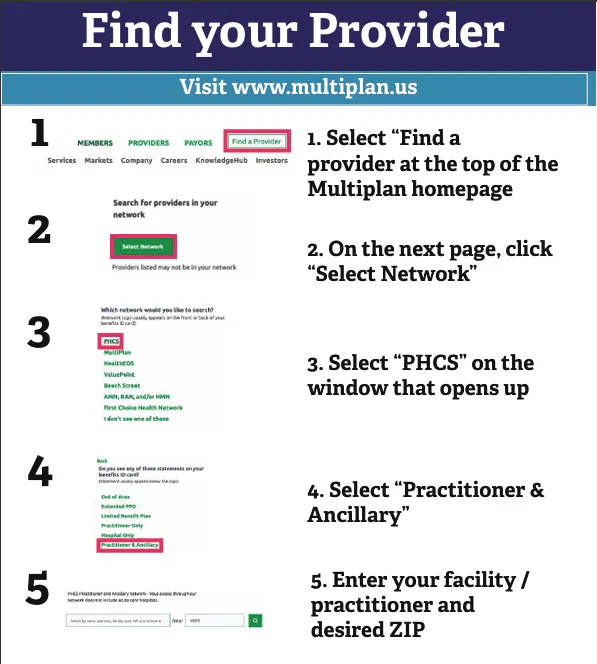
Step-by-step guide to searching the PHCS network on multiplan.us.
View Guide: Find Your Provider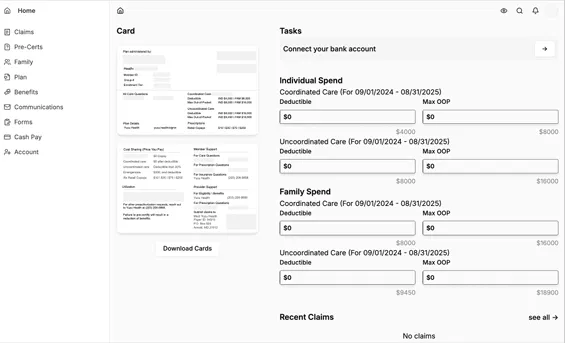
Get to know your Securus portal: ID cards, claims, spending, and forms.
View Guide: Member Portal GuideHow your claims are priced against Medicare rates, what a balance bill is, and when you're protected.
Read the Guide: RBP Pricing & Balance BillsYour protections against surprise bills for emergency care and certain out-of-network services.
Read the Guide: No Surprises Act ProtectionsHow to invite a new hire to your plan by email from the Members page — best for groups without an HRIS integration.
Read the Guide: Invite New EmployeesStep 4 of 4
Submit required forms and keep your compliance notices on file. Your employees may need access to some of these documents.
This guide is not an all-inclusive list of every federal or state requirement that may apply to your company or benefit plans. It is primarily focused on your self-funded medical plan. Your responsibilities may vary depending on your plan design, plan year, state, vendors, TPA, pharmacy benefit manager (PBM), and other factors. Some requirements may be handled by your TPA, carrier, PBM or another service provider — do not assume a requirement is being handled without confirming it. Even when a third party performs a filing or administrative function, the employer/plan sponsor may still have legal responsibility for making sure the requirement is satisfied. Triad handles the items specifically identified below as part of its compliance services. If you offer dental, vision, life, disability, accident, critical illness, HSA, FSA or other ancillary benefits, additional requirements may apply that are not included on this page.
Use the right care setting for the situation, and reach out when you need help.
Ask Securus Care Coordination about virtual care options and your plan coverage before scheduling.
Search the PHCS network before scheduling to keep your costs predictable.
Use the pharmacy contact on your ID card to confirm covered prescriptions and costs before filling them.